NestCloud™ — Sheet Metal Nesting Software for Plasma & Laser Job Shops
Browser-based · No install · No sales call required

STOP LEAVING
MATERIAL
ON THE TABLE

Your first job nested and ready to cut in under three minutes

Credit card required · No charge until day 15 · Cancel any time

$59.99 Forge Plan / Month
21 NC Post-Processor Formats
10 File Formats Accepted
200 Parts Per Job
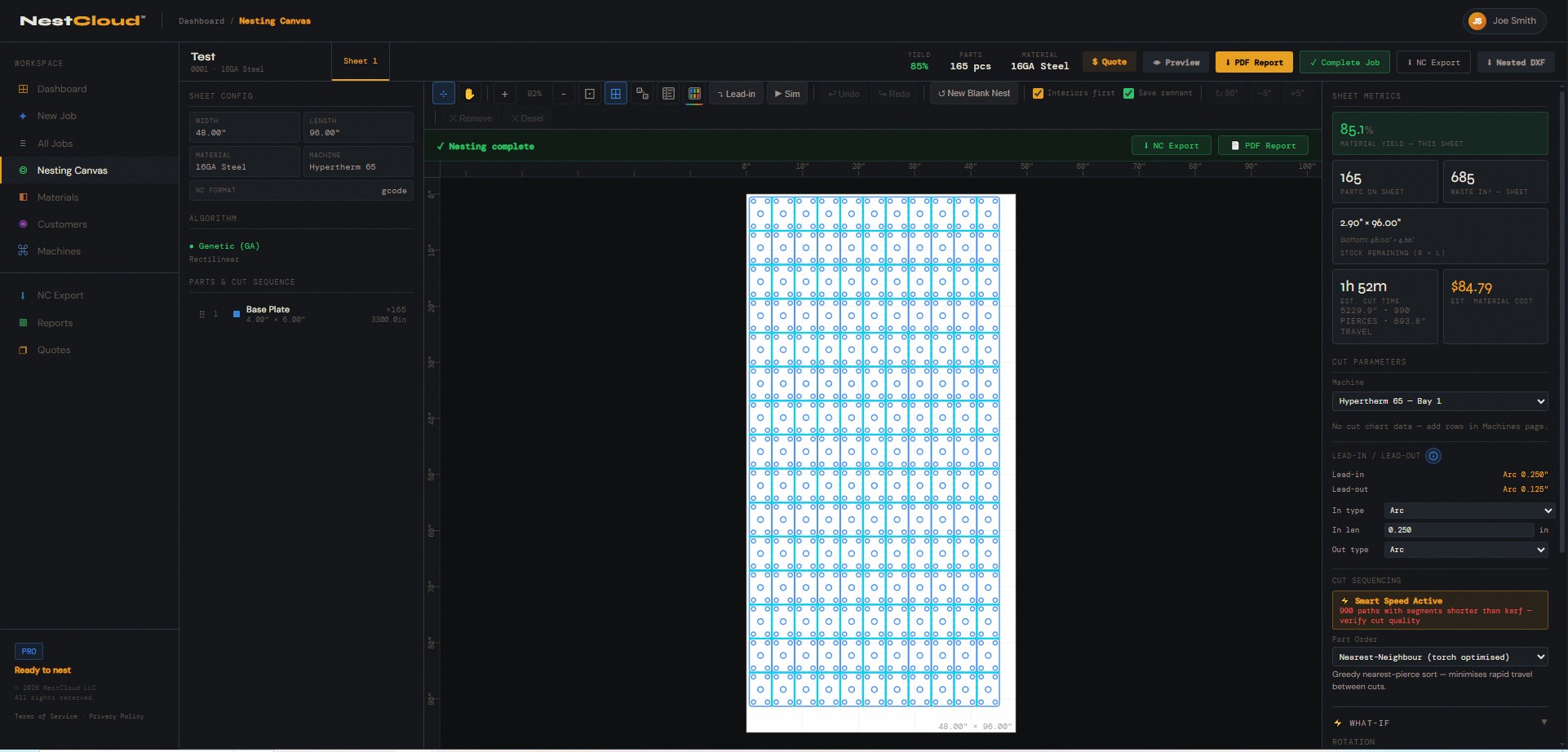
app.getnestcloud.com · Nest Job #42
NestCloud nesting canvas — 165 parts nested at 85% yield on a 48x96 sheet of 16GA Steel
Zero install — runs in any browser
All 21 NC formats included — no add-on modules
Machine agnostic — plasma, laser, any brand
Transparent pricing — Forge $59.99/mo, Pro $224.99/mo
THC, IHS, Hole Overburn included at no extra charge
The problem

Your nesting software
is working against you

Most nesting tools on the market were designed before cloud existed. They're Windows-only, quote-required, and locked behind training programs that take weeks. Small shops shouldn't have to fight their software to get parts on the table.

01

Windows-only desktop installs

SigmaNEST and ProNest require a Windows machine, license servers, USB dongles, and IT to manage updates. Try running your nesting software from a tablet on the shop floor — you can't. NestCloud works in any browser on any device.

02

No transparent pricing for small shops

SigmaNEST and Lantek are enterprise quote-only — every shop goes through a sales process regardless of size. There's no self-serve entry point, no price on the page, and no way to evaluate cost without talking to a rep. NestCloud™ puts Forge and Pro pricing on the page. No call required.

03

Cut quality features cost extra

ProNest reviewers specifically complained that "advanced plasma" features were a "hefty-priced add-on." THC scheduling, IHS, hole overburn, and FeatureSense are built into NestCloud™ — included in your base subscription, full stop.

NC
NestCloud™ fixes all three
Browser-based with no install. Self-serve pricing on the page. Cut quality features included — THC scheduling, IHS, hole overburn arc, FeatureSense, lead-in/lead-out, pierce-first mode, and more. One subscription, your machine, your browser.
How it works

From file import
to cut-ready output
in four steps

No training week required. If you can drag a file into a browser, you can run a nest job.

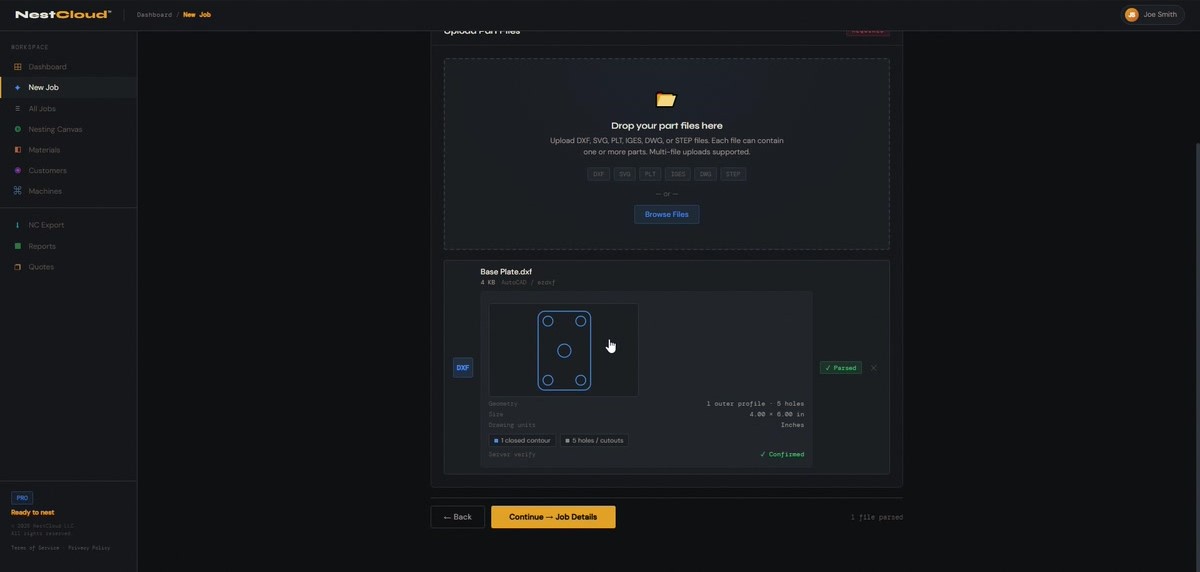
1

Import Your Parts

Drag and drop DXF, DWG, SVG, AI, EPS, PDF, STEP, or NC1 files. Layer names auto-map to cut/scribe/drill operations.

NestCloud file import panel
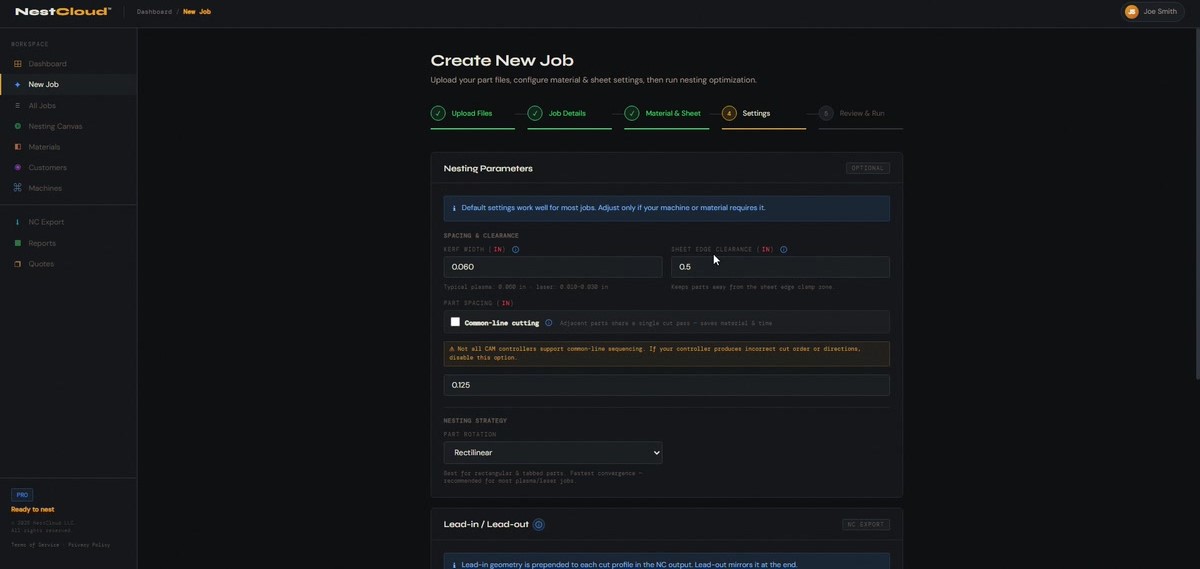
2

Set Your Sheet

Enter sheet dimensions, kerf width, part spacing, and rotation tolerance. The What-If panel shows yield estimates in real time as you adjust.

NestCloud sheet setup dialog
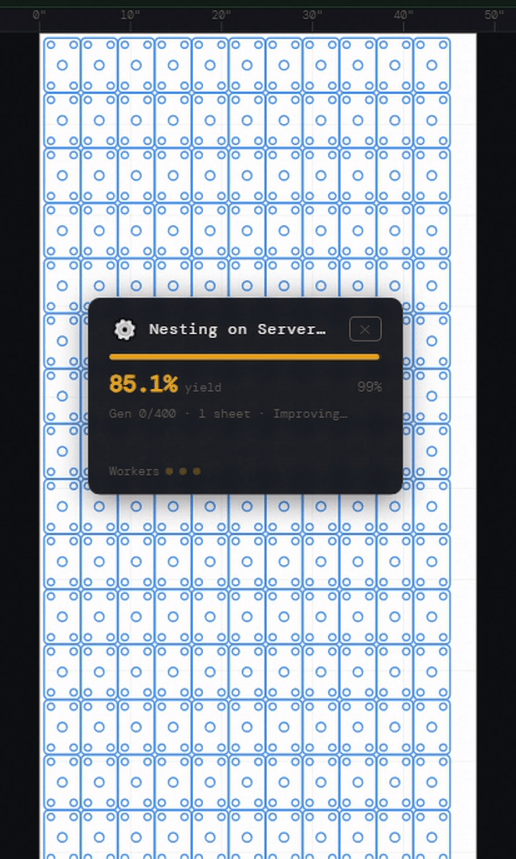
3

Run the Nest

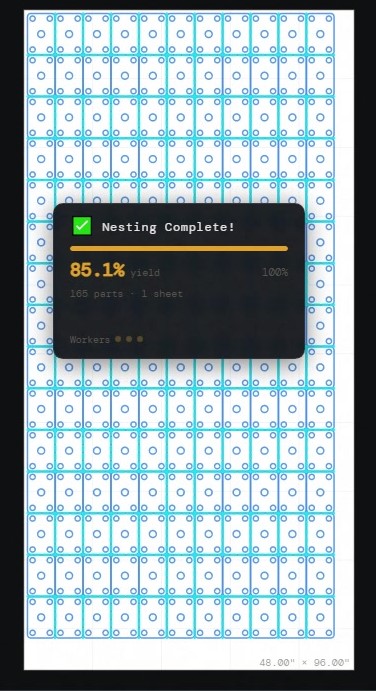
The genetic algorithm optimizer runs in your browser with a live canvas preview. Watch parts arrange in real time. Re-run with tweaked settings in one click.

NestCloud nesting animation — parts arranging in real time
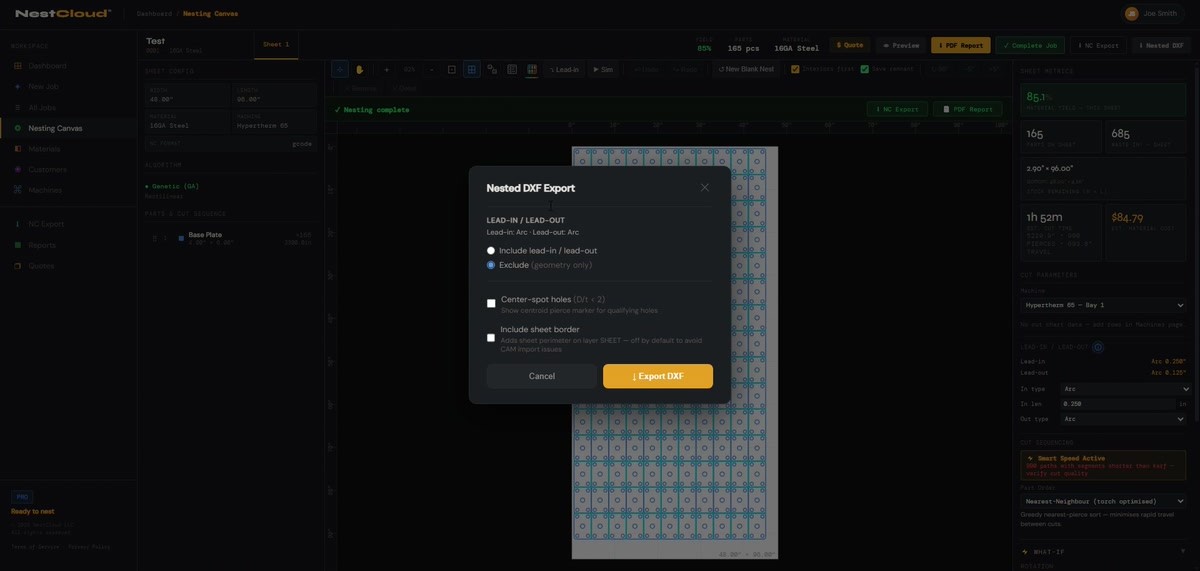
4

Export to Your Machine

Pick your control from 21 NC formats — Mach3, Hypertherm, Fanuc, LightBurn, and more. Or export a nested DXF for downstream use. Download and cut.

NestCloud NC export dialog
Nesting engine

Genetic algorithm.
No-Fit Polygon core.

NestCloud's nesting engine uses true geometric No-Fit Polygon (NFP) collision detection for precise part placement. The optimizer runs on NestCloud's servers and streams results back in real time — you see live canvas updates as each better arrangement is found, with no manual re-runs needed.

True NFP geometry — parts nest flush, not bounding-box approximations
Live canvas animation — "New best arrangement!" previews as GA runs
Up to 200 parts per job, 20 sheets per run
Rotation options: Rectilinear, Mixed, Complex, Fine
What-If panel — adjust kerf, spacing, rotation and see yield estimate without re-running
Waste heatmap — visual overlay showing unused sheet area by intensity
app.getnestcloud.com · Nesting in progress…
NestCloud nesting engine — live canvas animation as parts arrange
Cut simulation

Watch the torch
path before you cut

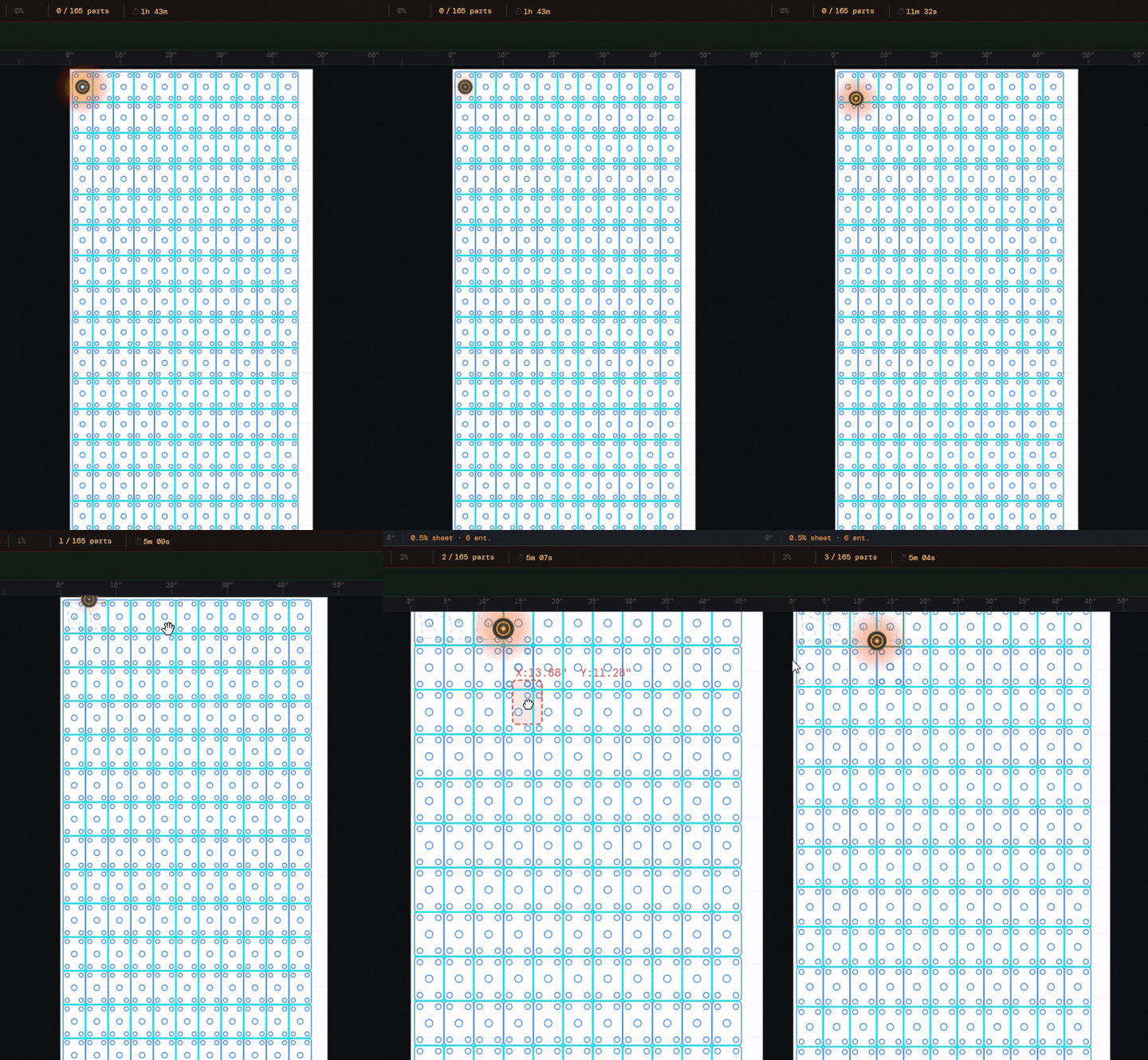
Run a full animated cut simulation in your browser — no separate module, no extra click to launch a viewer. Control playback speed from 0.5× to 20×. Watch spark particles, track parts-cut count, and review the full cut order before sending NC to the machine.

Animated torch path with spark particles
Speed control: 0.5× — 20× playback
Parts-cut counter tracks job progress
Cut-order badges — drag to reorder sequence
Sheet tabs for reviewing multi-sheet jobs
No separate viewer required. Competitors run cut simulation as a separate desktop application step. NestCloud™ simulates directly on the nest canvas.
app.getnestcloud.com · Cut Simulation
NestCloud cut simulation
Pro — Shop tools

Run your shop,
not just your nest

Pro adds the tools that connect the nest to the rest of your operation: remnant tracking, yield analytics, customer database, quote management, and batch NC export. One subscription for the whole shop.

Remnant Tracking — inventory of leftover sheets, auto-suggested on new jobs
Shop Analytics — yield trend chart, material breakdown, job history KPIs
Customer Database — contact info, job history, estimated value
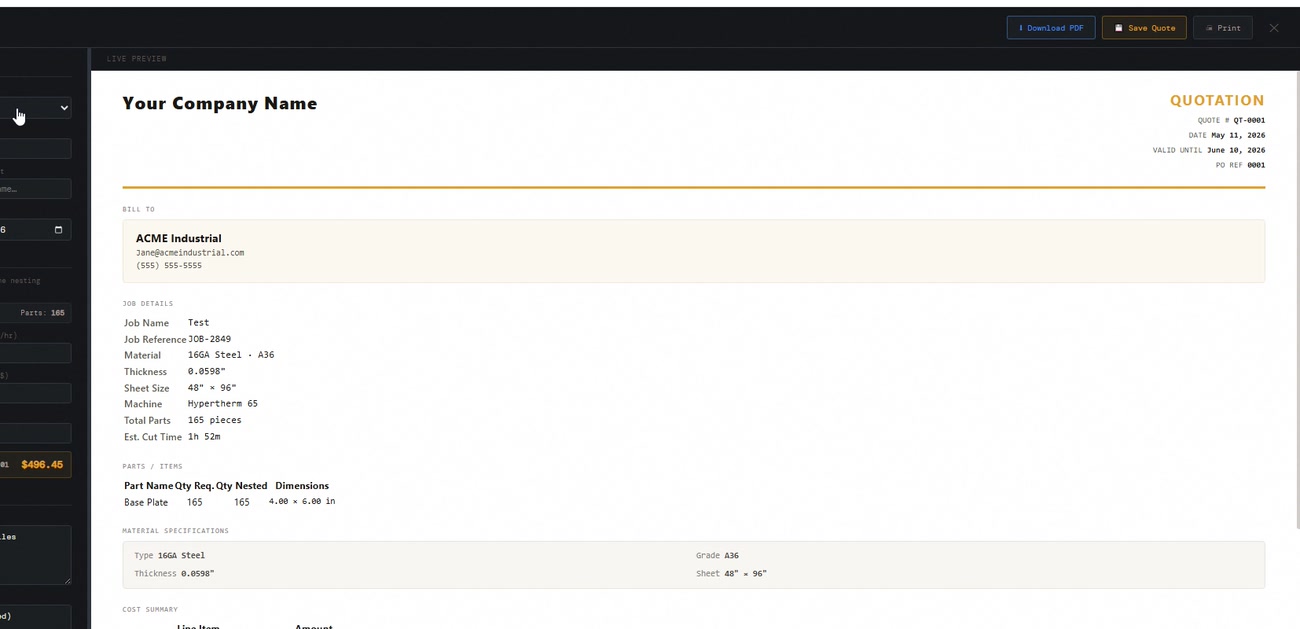
Quote Builder — material, machine time, labor, overhead, margin → formatted quote PDF
NC Queue — batch NC export across multiple jobs with per-job format selector
PDF Job Reports — yield KPIs, part manifest with thumbnails, sheet layout images
app.getnestcloud.com · Analytics
NestCloud Pro analytics dashboard
Cut quality

Cut quality features
included — no add-ons

ProNest reviewers called advanced plasma features a "hefty-priced add-on." Every item below is built into NestCloud™ and included in your base subscription.

01

Hole Overburn Arc

Overburn arc on circular holes eliminates dross and produces clean, round pierced holes in plasma.

Plasma
02

THC Scheduling

Torch height control automatically disabled around lead-ins, small holes, and sharp corners to prevent arc-loss crashes.

Plasma + Laser
03

IHS (Initial Height Sensing)

G31/G92 commands inserted at sheet, part, or contour frequency — you choose the IHS strategy per machine.

Plasma
04

FeatureSense

Automatically detects small holes (D/t ratios), slots, and sharp corners. Reduces feed to 60–80% and disables THC for those features.

Plasma + Laser
05

Lead-in / Lead-out

Straight, arc, edge-start, or none — with full collision avoidance. Soft-start ramp at lead-in, safe Z raise between cuts.

Plasma + Laser
06

Common-Line Cutting

Shared edges cut once — torch or beam bridges to the next part without lifting. Saves material and cut time.

Plasma + Laser
07

Pierce-First Mode

Pre-pierces all features before contour cutting begins. Reduces thermal distortion on tight-tolerance plasma jobs.

Plasma
08

Micro-Tabs (Laser)

Configurable tab count and width per machine profile on outer profiles. Keeps parts in the sheet until the job completes.

Laser
09

True Arc Interpolation

G02/G03 arc commands on circular holes for laser formats — replaces the 64-segment polyline approximation used by most tools.

Laser
10

Multi-Operation Layers

DXF layer names auto-map to cut, scribe, or ignore operations. Drill operation available on Pro and above. Override per entity group in the Part Ops modal.

Plasma + Laser
11

Plasma Scribe Pass

Separate pre-cut scribe pass for marking entities, with automatic machine scribe on/off codes in the NC output.

Plasma
12

Center Spotting

Brief pierce dimple at hole centroids for drill location marking. Helps production teams locate drill centers without layout.

Plasma
All of the above are included in your base subscription. No add-on module. No "Advanced Plasma" upgrade. Forge ($59.99/mo) and Pro ($224.99/mo) both include the full cut quality feature set.
NC post-processor formats

21 formats.
One subscription.
Any machine.

Drive a Hypertherm table and a Trumpf laser from the same NestCloud™ account. No machine-specific modules. No per-format upcharge. Switch formats from the export dialog in seconds.

Plasma — 13 formats
Generic G-code Mach3 Mach4 Fanuc ESSI Hypertherm Phoenix Hypertherm Edge Trumpf TruTops LinuxCNC Mitsubishi M70 Mazatrol IGEMS ShopEdge
Laser — 8 formats
GRBL Laser Trumpf TruLaser Bystronic BySoft Amada AMNC-D LightBurn Mazak Optiplex Amada AMNC-3i Mitsubishi eX-F
ProNest's best features only work on Hypertherm HPRXD and XPR plasma systems. Shops running Lincoln, Thermal Dynamics, Kjellberg, or any non-Hypertherm machine get none of ProNest's cut quality differentiation. NestCloud™ delivers consistent THC scheduling, IHS, and FeatureSense across all 21 formats, regardless of machine brand.
Accepted file formats — 10 types
DXF DWG SVG AI (Adobe Illustrator) EPS STP / STEP PDF PLT / HPGL IGS / IGES NC1 / DSTV
Export formats
21 NC post-processor formats DXF (nested layout)
How we compare

NestCloud™ vs.
ProNest & SigmaNEST

We'll be honest. ProNest and SigmaNEST are mature products with deep machine-vendor integrations. But for small-to-mid shops that just need to nest parts and cut metal without a six-figure software budget, the comparison isn't close.

Feature
NestCloud™
ProNest
SigmaNEST
Runs in browser — no Windows install
Pricing published on website
LT only
✕ Quote
Self-serve signup — no sales call
Partial
21 NC formats — all machine brands
Hypertherm-best
Module add-ons
THC scheduling included in base plan
Add-on cost
Add-on cost
Hole overburn arc — all brands
Hypertherm only
Limited
IHS (Initial Height Sensing)
Hypertherm only
Limited
Waste heatmap — real-time yield
In-browser cut simulation
Separate app
Separate step
14-day free trial — self-serve
Trial available
SolidWorks / Inventor live link
Roadmap
Add-on
✓ (add-on)
MES / ERP / shop floor tracking
Long-term roadmap
✓ Partner
Pricing

Simple pricing.
No sales call required.

The price is on the page. Sign up with a credit card and you're nesting in minutes. Both plans include a 14-day free trial — no charge until day 15.

14-Day Free Trial — Credit Card Required
Forge
$59.99/mo
or $599.99/year (save ~17%)
1 seat · 1 machine
What's included
Genetic algorithm nesting — up to 50 parts/job
All 21 NC post-processor formats
10 file import formats (DXF, DWG, SVG, AI, EPS, STP, PDF, PLT, IGES, NC1)
THC scheduling, IHS, FeatureSense, hole overburn arc
Lead-in/lead-out, pierce-first, common-line cutting
Cut simulation, waste heatmap, What-If panel
10-job history · 45° max rotation · 1 machine
No Reports, Quotes, NC Queue, Remnant Tracking
Start Forge Trial →
14-day free trial
Credit card required
No charge until day 15
Planned — Not Yet Available
Enterprise
Coming
Soon
Planned inclusions
Everything in Pro
Unlimited seats
SLA-backed support
Dedicated onboarding
Custom NC format development
Contour fit rotation for precision nesting placement
Volume pricing for multi-location shops
Contact Us
Not yet available
Enterprise is in planning
FAQ

Common questions
from the shop floor

You've got a job to run. Here are the answers to the questions fabricators ask most before they start a trial.

Yes. NestCloud exports NC programs in 13 plasma formats: Generic G-code, Mach3, Mach4, Fanuc, ESSI, Hypertherm Phoenix, Hypertherm Edge, Trumpf TruTops, LinuxCNC, Mitsubishi M70, Mazatrol, IGEMS, and ShopEdge. If your control runs any standard G-code dialect, Generic G-code will work. Not sure? Email us your control model.
NestCloud accepts 10 file formats: DXF, DWG, SVG, AI (Adobe Illustrator), EPS, STP/STEP, PDF, PLT/HPGL, IGS/IGES, and NC1/DSTV. DXF is the primary format for fabrication shops.
No. NestCloud runs entirely in your browser — Chrome, Edge, Firefox, or Safari. No download. No installer. No license server. No USB dongle. Create an account and start nesting within minutes of signing up.
ProNest is a Windows desktop application. Its best cut quality features — True Hole, True Bevel, RapidPart — only work on Hypertherm HPRXD or XPR plasma systems. ProNest reviewers specifically called advanced plasma features a "hefty-priced add-on."

NestCloud is browser-based, machine-agnostic, and includes THC scheduling, IHS, FeatureSense, and hole overburn arc in the base subscription — no add-on required, no Hypertherm system required.
Sign up with a credit card. You get full access to the plan you choose for 14 days at no charge. Billing starts automatically on day 15. Cancel any time before then and you won't be charged a thing. Stripe handles all billing — no invoices, no NET-30, no procurement.
Forge ($59.99/mo, 1 seat) is built for a single operator on one machine. It covers nesting up to 50 parts/job, all 21 NC formats, and the full cut quality feature set. Pro ($224.99/mo, 3 seats included) removes all part limits, adds Remnant Tracking, Shop Analytics, Customer database, NC Queue, and Quote management. Additional seats on Pro are $49/mo each.
Not with a live link currently — for now, export flat DXF or STEP files from your CAD system and import those. DXF is the native format for most plasma and laser fabrication shops and imports in seconds. But get ready, because it's coming!
The NFP nesting optimizer runs on NestCloud's servers. When you kick off a nest, your part geometry is sent over an encrypted connection, the optimizer runs, and results stream back live — you see canvas updates as each better arrangement is found. The canvas, cut simulation, and all interactive tools run in your browser.

Ready when you are

NO INSTALL.
NO DEMO CALL.
JUST NEST.

Sign up in under a minute. Upload your first DXF, set your sheet size, run the nest, and download your NC file — all before the hour is up.

Forge from $59.99/mo · Pro from $224.99/mo  ·  Credit card required  ·  No charge until day 15